
How Does an HRMS Protect Employee Data? 8 Security Features Explained
An HRMS maintains employee data security through encrypted storage and transmission, role-based access control, multi-factor authentication, and detailed audit logs that record every change. Together, these measures keep payroll records, attendance entries, and personal documents accessible only to the people authorized to see them.
Why Does Employee Data Security Matter for HR Teams?
An HRMS stores a wide range of confidential information, including:
- Employee’s personal details
- Contact information
- Salary and payroll data
- Bank account details
- Attendance and leave records
- Performance reviews
- Tax and compliance documents
If this information is accessed by unauthorized individuals, it can lead to identity theft, financial losses, legal issues, and a loss of employee trust.
What Security Features Should an HRMS Have?
1. Role-Based Access Control
A modern HR software ensures that employees can only access information which are relevant to only their role.
For example:
Employees can view only their own profiles, managers can access information related to their teams, HR can manage employee records, and payroll administrators can work only with salary-related data.
This controlled access minimizes the chances of unauthorized data exposure.
2. Secure Login and Authentication
Modern HRMS platforms use multiple layers of authentication, such as:
- Strong passwords – Using passwords which contains upper-case and lower-case letters, numbers and special characters.
- Multi-Factor Authentication (MFA)
- One-Time Password (OTP) verification
- Automatic account lock after multiple failed login attempts
- Session Timeouts – This feature is very useful when someone else has an access to employee’s device.
These measures help prevent unauthorized access to the system.
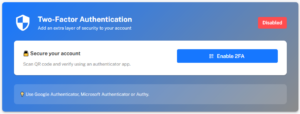 Multi Factor Authentication in Emgage HRMS
3. Data Encryption
Employee information is encrypted both while it is being transmitted and while it is stored in the database. Even if someone intercepts the data, encryption ensures it remains unreadable without the proper authorization.
4. Audit Logs
Every important activity performed within the HRMS is automatically recorded, allowing organizations to track who made changes and when, which includes:
- Employee profile updates
- Salary modifications
- Leave approvals
- Attendance corrections
- Payroll processing
Audit logs provide complete transparency and help organizations monitor system activity.
5. Regular Data Backups
Data loss can happen due to hardware failures, accidental deletion, software issues, or cyberattacks. Regular automated backups ensure that important employee information can be restored quickly whenever needed.
6. Secure Payroll Processing
Payroll contains highly sensitive financial information. A secure HRMS protects payroll by:
- Restricting access to authorized users
- Maintaining approval workflows
- Tracking salary revisions
- Generating secure salary slips
By restricting payroll activities to authorized personnel, organizations can reduce errors and maintain complete confidentiality.
See how payroll security failures actually play out in Top 5 Payroll Mistakes SMEs Make (And How Emgage Prevents Them).
7. Employee Self-Service (ESS)
Instead of sharing confidential documents through emails or printed copies, employees can securely access their documents from the system, which can include:
- Pay-slips
- Attendance records
- Leave balances
- Tax documents
- Personal information
Giving employees secure self-service access improves convenience while reducing the risk of confidential documents being shared through emails or printed copies.
Read more on How Employee Self-Service Helps HR Create the Right Impact.
8. Compliance Support
A secure HRMS helps organizations maintain compliance by:
- Protecting confidential employee records
- Maintaining audit trails
- Managing document retention
- Supporting data privacy requirements
For an HRMS, the Digital Personal Data Protection Act, 2023 (DPDP Act) is especially relevant because employee profiles, salary records, bank details, attendance and other HR records can contain digital personal data. Section 8 requires a Data Fiduciary to take reasonable security safeguards to prevent personal data breaches and to erase personal data when the specified purpose is no longer being served, unless retention is required by law. For an HRMS, this translates into practical controls such as encryption, access controls, secure authentication and documented retention processes, together with evidence that reasonable security measures were implemented. A breach of the security-safeguard obligation under Section 8(5) can attract a penalty of up to ₹250 crore under Section 33 read with the Schedule.
Primary source: India Code — Digital Personal Data Protection Act, 2023 (Sections 8 and 33).
For a full breakdown of DPDP Act obligations for HR data — including penalties of up to ₹250 crore for inadequate security safeguards — see Why Indian SMEs are Switching to Emgage HRMS for DPDP & Labor Code Readiness in 2026.
How Can Organizations Maximize HRMS Security?
| Practice | What Could Go Wrong Without It | Source / Standard |
| Use strong and unique passwords | Weak or reused passwords can make employee and admin accounts easier to compromise. | CERT-In – Password Management and Security Advisory (2022) recommend passwords of at least 8 characters with a mix of uppercase/lowercase letters, numbers and special characters. cert-in |
| Enable Multi-Factor Authentication (MFA) | If a password is stolen, an attacker may be able to access the HRMS without another verification step. | CERT-In – 15 Elemental Cyber Defense Controls for MSMEs (2025) recommends MFA for critical systems, administrative accounts and remote access. cert-in |
| Use role-based access | Employees may get access to salary, bank or personal information they do not need for their job. | CERT-In – 15 Elemental Cyber Defense Controls for MSMEs (2025) recommends role-based access and least privilege. cert-in |
| Review user permissions regularly | Employees who change roles or leave the organization may continue to have access they no longer need. | CERT-In – 15 Elemental Cyber Defense Controls for MSMEs (2025) recommends reviewing access at least quarterly and when employees change roles or leave. cert-in |
| Lock accounts after repeated failed logins | Attackers can repeatedly guess passwords through brute-force attempts. | CERT-In – 15 Elemental Cyber Defense Controls for MSMEs (2025) recommends temporarily locking accounts after 3–5 failed login attempts. cert-in |
| Keep the HRMS and supporting software updated | Known software vulnerabilities may remain exploitable if updates and security fixes are not applied. | CERT-In cybersecurity guidance recommends keeping applications and systems updated and reducing exposure to known vulnerabilities. cert-in |
| Monitor audit logs | Unusual access or unauthorized changes may go unnoticed, making investigation more difficult. | DPDP Act, 2023 – Section 8 requires appropriate technical and organizational measures and reasonable security safeguards to prevent personal data breaches. indiacode.nic.in |
| Remove inactive accounts promptly | An unused account can become an unnecessary access point after an employee leaves. | CERT-In – 15 Elemental Cyber Defense Controls for MSMEs (2025) recommends reviewing access when employees exit and following a formal offboarding process. cert-in |
What Are the Most Common HRMS Security Mistakes?
- Sharing login credentials
- Granting unnecessary admin access
- Using weak passwords
- Ignoring software updates
- Downloading confidential data unnecessarily
- Leaving inactive accounts active
As organizations continue to digitize HR operations, protecting employee information is no longer optional—it’s a business necessity. A secure HRMS not only safeguards sensitive data but also builds employee trust and helps organizations stay compliant in an increasingly digital workplace.
